
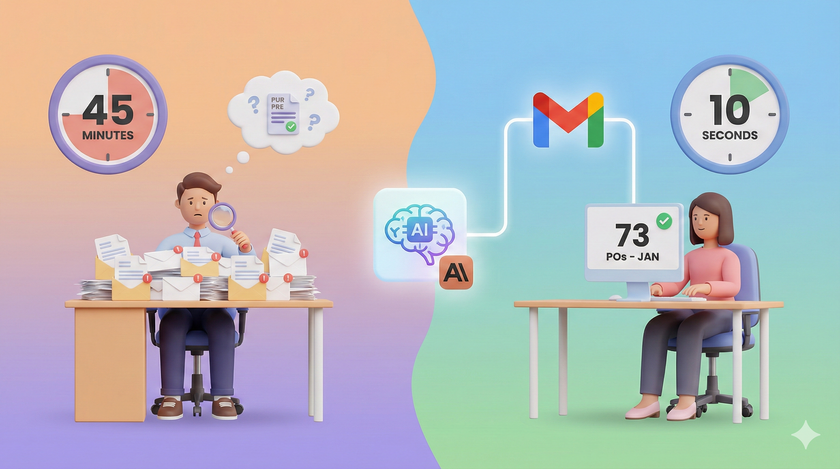
Neha runs a building materials distribution business in Jaipur. ₹8 crore turnover. 14 employees. Last Friday, her CA asked a simple question: "How many purchase orders did we receive in January?"
Neha called Rohit. Rohit opened Gmail. He searched "purchase order." Got 73 results. Some were actual POs. Some were follow-ups about POs. Some were old threads from last year that Gmail helpfully surfaced. He started opening them one by one. Counting. Cross-checking dates. Separating confirmed orders from inquiries.
Forty-five minutes later, he had a number. He was not even sure it was right.
Now think about this. The answer was already in Neha's inbox. Every single PO had arrived by email. The data was all there. But it was buried across 73 email threads, mixed in with 4,000 other messages from January. No human can scan 73 threads, extract the relevant ones, and give you a count in under 45 minutes.
Rohit is not slow. The task is inhuman.
And this is just one question. Neha has dozens of these every month. Which vendors confirmed delivery this week? What payment terms did we agree with Mehta Industries? Which clients have not placed an order in the last 60 days? How many complaints came in last month? Each answer lives in her Gmail. Each answer requires someone to dig through hundreds of threads. Each answer takes 30 to 60 minutes of a person's time.
That is Rohit's entire week. Reading emails that have already been read. Looking for answers that already exist.
The ₹3 lakh assistant you already pay for
Add it up. Rohit spends roughly 2 hours a day digging through email for answers. That is 10 hours a week. 40 hours a month. Almost his entire salary goes toward reading emails and extracting information that a machine can pull in 10 seconds.
You are paying a full-time salary for a human search engine.
What changes when you connect Gmail to Claude
Claude has a feature called Connectors. You will find it in Settings. You click "Connect," sign in with your Google account, and Gmail is connected. No coding. No IT team. Two minutes.
Once connected, Claude does not just summarize your latest emails. That is the obvious use. The real power is what happens when you ask questions that require reading across dozens or hundreds of emails at once.
Here is what that looks like.
Aggregation. You ask: "How many purchase orders did I receive in January? Give me the count, the total value, and a list of which clients sent them."
Claude scans your inbox. Not 10 emails. All of them. It reads through every thread, identifies actual POs, ignores the follow-ups and the noise, pulls the numbers, and gives you a table. Client name. PO number. Value. Date. Total at the bottom.
Ten seconds. Not 45 minutes. Not "I think it was around 73."
Cross-referencing. You ask: "I have 5 vendors who promised delivery this week. Check my email and tell me which ones have actually confirmed shipment."
Claude finds the original commitment emails. Then searches for confirmation emails from those same vendors. Matches them. Tells you: "3 out of 5 confirmed. Sharma Steels and Gupta Packaging have not confirmed yet. Here are the last messages from each."
Rohit would need to open 10 email threads, read through each one, mentally track which vendor said what, and report back. Twenty minutes minimum. Claude does it before you finish your chai.
Pattern detection. You ask: "Which of my regular clients have not placed an order in the last 60 days?"
This is the question nobody ever asks because it takes too long to answer manually. Claude goes through your order-related emails from the last 6 months, builds a list of regular clients, checks which ones have gone quiet, and flags them. These are the clients Priya should be calling today. Instead of waiting until the quarterly review to realize you lost a client, you catch it in week three.
Historical lookup. You ask: "What payment terms did we agree with Mehta Industries? Check our email history."
Claude finds the original negotiation thread from 8 months ago. Pulls out the agreed terms. No asking Rohit. No searching through old WhatsApp messages. No calling Mehta ji's office and asking them what they remember.
Deadline tracking. You ask: "Go through this week's emails and tell me every commitment my team made. Who promised what to whom, and by when."
Claude reads every outgoing email from the week. Identifies promises, deadlines, and deliverables. Gives you a list. Now you know what is due next week before anyone drops the ball.
Morning triage. You ask: "Show me everything from the last 24 hours that needs a decision from me. Ignore newsletters, CC emails, and FYI forwards. Only things where someone is waiting for my response."
Claude filters your inbox down to the 3-4 things that actually matter. Your morning goes from "scroll through 47 emails" to "here are your 4 decisions."
| The question | How long it takes Rohit | How long it takes Claude |
|---|---|---|
| How many POs did we get last month? | 45 minutes | 10 seconds |
| Which vendors have not confirmed delivery? | 20 minutes | 10 seconds |
| Which regular clients have gone quiet? | Nobody ever checks | 10 seconds |
| What terms did we agree with Mehta Industries? | 15 minutes (if he finds it) | 10 seconds |
| What commitments are due next week? | Nobody tracks this | 10 seconds |
| What needs my decision today? | 30 minutes of scrolling | 10 seconds |
The part most people miss
Connecting Gmail is step one. But Claude still does not know your business. It does not know that "PO" in your world means a WhatsApp message with quantities, not a formal purchase order document. It does not know that "urgent" from Gupta Traders means next week, but "urgent" from Mehta Industries means today. It does not know that delivery confirmation from Sharma Steels always comes from their dispatch team, not their sales team.
This is where Skills come in.
I wrote about Skills yesterday. A skill is a set of rules you teach Claude about how your business works. You explain it in plain language. Claude remembers it forever.
When you combine a Connector with a Skill, something powerful happens. The Connector gives Claude access to your email. The Skill tells Claude how to read it the way Rohit does. What to look for. What to ignore. What "urgent" actually means. How to identify a real PO versus an inquiry.
Connector without a Skill is a smart intern on day one. Fast, but clueless about your business. Connector with a Skill is Rohit after 4 years. Fast, and knows exactly what matters.
| Setup | What you get |
|---|---|
| Claude alone (no connector, no skill) | A smart AI that can write messages but cannot see your email. |
| Claude + Gmail Connector | A fast reader that can scan your inbox but does not know your business. |
| Claude + Gmail Connector + Skill | A fast reader that knows your vendors, your clients, your terms, and your priorities. Rohit's judgment at machine speed. |
How to set it up (5 minutes)
- Open claude.ai. Go to Settings. Find Connectors. Click "Connect" next to Gmail. Sign in with your Google Workspace account. Done. Two minutes.
- Start with one question you normally ask Rohit. "How many POs did we get in January?" or "Which vendors have not confirmed delivery this week?" Type it into Claude. Look at the result. Compare it to how long it takes a person.
- Try the question nobody ever asks because it takes too long. "Which regular clients have gone quiet in the last 60 days?" or "What commitments did my team make this week?" These are the questions that prevent problems before they happen. You never had time to ask them. Now you do.
- Once you see the value, create a Skill for how Claude should read your email. Tell it: "When I ask about purchase orders, I mean any email where a client mentions quantities and product names. Ignore general inquiries. When I say urgent, here is what that means for each client..." Read last week's post on Skills for exact steps.
- Connect Google Drive while you are at it. Same page. Same two-minute process. Now Claude can pull up proposals, contracts, and spreadsheets without asking Rohit.
The information that runs your business is already in your inbox. Every PO. Every confirmation. Every complaint. Every commitment. It has been sitting there, waiting for someone with the time to read it all.
Now someone does.
What do you think? Post your thoughts in the comments.