A client called. They are upset. The delivery was wrong.
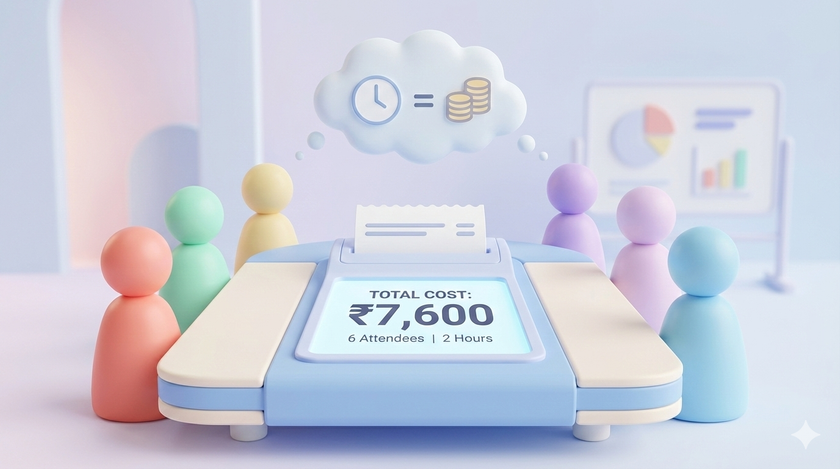
Within 10 minutes, 6 people are in the conference room. You. The sales head. The operations manager. The warehouse supervisor. The dispatch coordinator. The accounts person (because there might be a credit note).
Two hours later, the issue is resolved. Everyone goes back to their desks. Crisis handled.
Nobody asks what just happened.
The cost of firefighting
Let me calculate what that “emergency meeting” actually cost you.
| Role | Hourly Rate | Time | Cost |
|---|---|---|---|
| You (Owner) | ₹1,700 | 2 hrs | ₹3,400 |
| Sales Head | ₹680 | 2 hrs | ₹1,360 |
| Operations Manager | ₹570 | 2 hrs | ₹1,140 |
| Warehouse Supervisor | ₹340 | 2 hrs | ₹680 |
| Dispatch Coordinator | ₹230 | 2 hrs | ₹460 |
| Accounts Person | ₹280 | 2 hrs | ₹560 |
Total cost: ₹7,600
For one wrong delivery.
Now here is the uncomfortable question. How many times does this happen in a month?
If this kind of firefighting happens twice a week, you are spending ₹60,000 per month on emergency meetings. ₹7.2 lakhs per year. Just on gathering people in a room to solve problems that should not have happened.
The real problem
Nobody tracks firefighting costs.
Planned meetings show up on calendars. They have invites. They have agendas (sometimes). You can look at your calendar and see where your time went.
Firefighting? It just happens. Someone walks into your office. “Sir, we have a problem.” Twenty minutes later, half your senior team is huddled around a table.
There is no calendar invite. There is no agenda. There is no record that this meeting ever happened.
And because there is no record, there is no accountability.
What if you could see it?
Imagine if every firefighting session had a price tag.
Client complaint meeting: 6 attendees, 2 hours. Cost: ₹7,600
Vendor payment issue: 4 attendees, 45 minutes. Cost: ₹1,800
Delivery delay escalation: 5 attendees, 1.5 hours. Cost: ₹4,200
Wrong invoice correction: 3 attendees, 30 minutes. Cost: ₹900
Now add them up. See the monthly total. See which types of issues cost the most.
Suddenly you are not just solving problems. You are asking why these problems keep happening.
The pattern becomes visible
After a month of tracking, you might find:
- 40% of firefighting cost comes from delivery issues
- The same 3 people are pulled into every meeting
- Tuesdays and Fridays have the most emergencies
- Most issues could have been prevented with a 10-minute check earlier
You could not see this before. Now you can.
And once you see it, you cannot unsee it. The next time 6 people gather for a 2-hour “quick discussion,” someone will ask: “Is this really a ₹7,600 problem?”
I built a tool for you
A simple Google Sheets tool that:
- Stores employee hourly rates in a sheet
- Opens a popup where you select attendees one by one
- Select meeting duration
- Select if it is recurring (for regular meetings) or one-time (for firefighting)
- Shows you the cost instantly
- Logs every calculation so you can review patterns
Setup in 5 minutes
Step 1: Open a new Google Sheet
Step 2: Go to Extensions > Apps Script
Step 3: Delete any code you see in the editor
Step 4: Copy the entire code from below and paste it
Step 5: Click the Save icon (or Ctrl+S)
Step 6: Close the Apps Script tab
Step 7: Refresh your Google Sheet (important!)
Step 8: You will see a new menu called “Meeting Cost Calculator”
Step 9: Click “Meeting Cost Calculator” > “Setup Sheets”
Step 10: A popup will ask for permission. Click “Continue” and allow access.
Done. You now have two sheets:
- Employees: Add your team members and their hourly rates
- Meeting Log: All your calculations get saved here
The code
Copy everything below this line:
/**
 * MEETING COST CALCULATOR
 */

function onOpen() {
  SpreadsheetApp.getUi()
    .createMenu('Meeting Cost Calculator')
    .addItem('Setup Sheets', 'setupSheets')
    .addItem('Calculate Meeting Cost', 'showMeetingDialog')
    .addToUi();
}

function setupSheets() {
  var ss = SpreadsheetApp.getActiveSpreadsheet();

  var employeesSheet = ss.getSheetByName('Employees');
  if (!employeesSheet) {
    employeesSheet = ss.insertSheet('Employees');
  }

  employeesSheet.getRange('A1:B1').setValues([['Employee Name', 'Hourly Rate (₹)']]);
  employeesSheet.getRange('A1:B1').setFontWeight('bold');
  employeesSheet.getRange('A1:B1').setBackground('#4285f4');
  employeesSheet.getRange('A1:B1').setFontColor('white');

  var sampleData = [
    ['Owner', 1700],
    ['Operations Head', 850],
    ['Sales Head', 680],
    ['Accounts Head', 450],
    ['HR Manager', 340],
    ['Team Lead 1', 280],
    ['Team Lead 2', 280],
    ['Executive 1', 170],
    ['Executive 2', 170]
  ];
  employeesSheet.getRange(2, 1, sampleData.length, 2).setValues(sampleData);

  employeesSheet.setColumnWidth(1, 200);
  employeesSheet.setColumnWidth(2, 150);
  employeesSheet.getRange('B:B').setNumberFormat('₹#,##0');

  var logSheet = ss.getSheetByName('Meeting Log');
  if (!logSheet) {
    logSheet = ss.insertSheet('Meeting Log');
  }

  var headers = ['Date', 'Meeting Name', 'Duration (hrs)', 'Attendees', 'Recurring', 'Frequency', 'One-time Cost (₹)', 'Annual Cost (₹)'];
  logSheet.getRange(1, 1, 1, headers.length).setValues([headers]);
  logSheet.getRange(1, 1, 1, headers.length).setFontWeight('bold');
  logSheet.getRange(1, 1, 1, headers.length).setBackground('#4285f4');
  logSheet.getRange(1, 1, 1, headers.length).setFontColor('white');

  logSheet.setColumnWidth(1, 100);
  logSheet.setColumnWidth(2, 200);
  logSheet.setColumnWidth(3, 120);
  logSheet.setColumnWidth(4, 300);
  logSheet.setColumnWidth(5, 80);
  logSheet.setColumnWidth(6, 100);
  logSheet.setColumnWidth(7, 130);
  logSheet.setColumnWidth(8, 130);
  logSheet.getRange('G:H').setNumberFormat('₹#,##0');

  SpreadsheetApp.getUi().alert('Setup complete!\\n\\n1. Go to "Employees" sheet and update names and hourly rates\\n2. Then use "Calculate Meeting Cost" from the menu');
}

function showMeetingDialog() {
  var html = HtmlService.createHtmlOutput(getDialogHtml())
    .setWidth(500)
    .setHeight(600);
  SpreadsheetApp.getUi().showModalDialog(html, 'Meeting Cost Calculator');
}

function getEmployees() {
  var ss = SpreadsheetApp.getActiveSpreadsheet();
  var sheet = ss.getSheetByName('Employees');

  if (!sheet) {
    return [];
  }

  var data = sheet.getDataRange().getValues();
  var employees = [];

  for (var i = 1; i < data.length; i++) {
    if (data[i][0] && data[i][1]) {
      employees.push({
        name: data[i][0],
        rate: data[i][1]
      });
    }
  }

  return employees;
}

function calculateCost(meetingName, attendees, duration, isRecurring, frequency) {
  var ss = SpreadsheetApp.getActiveSpreadsheet();
  var employeesSheet = ss.getSheetByName('Employees');
  var logSheet = ss.getSheetByName('Meeting Log');

  var employeeData = employeesSheet.getDataRange().getValues();
  var rateMap = {};
  for (var i = 1; i < employeeData.length; i++) {
    rateMap[employeeData[i][0]] = employeeData[i][1];
  }

  var totalRate = 0;
  for (var j = 0; j < attendees.length; j++) {
    totalRate += rateMap[attendees[j]] || 0;
  }

  var oneTimeCost = totalRate * duration;
  var annualCost = oneTimeCost;

  if (isRecurring) {
    switch(frequency) {
      case 'Daily':
        annualCost = oneTimeCost * 260;
        break;
      case 'Weekly':
        annualCost = oneTimeCost * 52;
        break;
      case 'Fortnightly':
        annualCost = oneTimeCost * 26;
        break;
      case 'Monthly':
        annualCost = oneTimeCost * 12;
        break;
    }
  }

  var today = new Date();
  var dateStr = Utilities.formatDate(today, Session.getScriptTimeZone(), 'dd-MMM-yyyy');

  logSheet.appendRow([
    dateStr,
    meetingName,
    duration,
    attendees.join(', '),
    isRecurring ? 'Yes' : 'No',
    isRecurring ? frequency : '-',
    oneTimeCost,
    annualCost
  ]);

  return {
    oneTimeCost: oneTimeCost,
    annualCost: annualCost,
    isRecurring: isRecurring
  };
}

function getDialogHtml() {
  return '<!DOCTYPE html><html><head><style>*{box-sizing:border-box;font-family:Arial,sans-serif}body{padding:15px;margin:0}h3{margin-top:0;color:#333}label{display:block;margin-top:15px;font-weight:bold;color:#555}input,select{width:100%;padding:10px;margin-top:5px;border:1px solid #ddd;border-radius:4px;font-size:14px}input:focus,select:focus{outline:none;border-color:#4285f4}.attendees-box{border:1px solid #ddd;border-radius:4px;padding:10px;margin-top:5px;min-height:80px;background:#f9f9f9}.attendee-tag{display:inline-block;background:#4285f4;color:white;padding:5px 10px;border-radius:15px;margin:3px;font-size:13px}.attendee-tag span{cursor:pointer;margin-left:8px}.btn{padding:12px 25px;border:none;border-radius:4px;cursor:pointer;font-size:14px;margin-top:20px}.btn-primary{background:#4285f4;color:white}.btn-primary:hover{background:#3367d6}.btn-secondary{background:#f1f1f1;color:#333;margin-left:10px}.btn-add{background:#34a853;color:white;width:auto;padding:10px 20px;margin-top:5px}.result{margin-top:20px;padding:20px;background:#e8f5e9;border-radius:8px;display:none}.result h4{margin:0 0 15px 0;color:#2e7d32}.cost-line{font-size:16px;margin:10px 0}.cost-big{font-size:28px;font-weight:bold;color:#1b5e20}.recurring-options{margin-top:10px;padding:10px;background:#fff3e0;border-radius:4px;display:none}.checkbox-row{display:flex;align-items:center;margin-top:15px}.checkbox-row input{width:auto;margin-right:10px}.checkbox-row label{margin:0;font-weight:normal}</style></head><body><h3>Calculate Meeting Cost</h3><label>Meeting Name</label><input type="text" id="meetingName" placeholder="e.g., Client complaint - wrong delivery"><label>Add Attendees</label><select id="employeeSelect"><option value="">-- Select Employee --</option></select><button class="btn btn-add" onclick="addAttendee()">+ Add</button><label>Selected Attendees</label><div class="attendees-box" id="attendeesBox"><span style="color:#999">No attendees selected</span></div><label>Duration (hours)</label><select id="duration"><option value="0.25">15 minutes</option><option value="0.5">30 minutes</option><option value="0.75">45 minutes</option><option value="1" selected>1 hour</option><option value="1.5">1.5 hours</option><option value="2">2 hours</option><option value="2.5">2.5 hours</option><option value="3">3 hours</option><option value="4">4 hours</option></select><div class="checkbox-row"><input type="checkbox" id="isRecurring" onchange="toggleRecurring()"><label for="isRecurring">This is a recurring meeting</label></div><div class="recurring-options" id="recurringOptions"><label style="margin-top:0">How often?</label><select id="frequency"><option value="Daily">Daily (260/year)</option><option value="Weekly" selected>Weekly (52/year)</option><option value="Fortnightly">Fortnightly (26/year)</option><option value="Monthly">Monthly (12/year)</option></select></div><div><button class="btn btn-primary" onclick="calculate()">Calculate Cost</button><button class="btn btn-secondary" onclick="google.script.host.close()">Close</button></div><div class="result" id="result"><h4>Meeting Cost</h4><div class="cost-line">One-time cost: <span id="oneTimeCost" class="cost-big"></span></div><div class="cost-line" id="annualLine" style="display:none">Annual cost: <span id="annualCost" class="cost-big"></span></div><p style="margin-top:15px;color:#666;font-size:13px">✓ Saved to Meeting Log sheet</p></div><script>var selectedAttendees=[];google.script.run.withSuccessHandler(function(e){var t=document.getElementById("employeeSelect");e.forEach(function(e){var n=document.createElement("option");n.value=e.name,n.text=e.name+" (₹"+e.rate+"/hr)",t.appendChild(n)})}).getEmployees();function addAttendee(){var e=document.getElementById("employeeSelect"),t=e.value;t&&(selectedAttendees.includes(t)?alert(t+" is already added"):(selectedAttendees.push(t),updateAttendeesBox(),e.value=""))}function removeAttendee(e){selectedAttendees=selectedAttendees.filter(function(t){return t!==e}),updateAttendeesBox()}function updateAttendeesBox(){var e=document.getElementById("attendeesBox");0===selectedAttendees.length?e.innerHTML=\'<span style="color:#999">No attendees selected</span>\':e.innerHTML=selectedAttendees.map(function(e){return\'<span class="attendee-tag">\'+e+\'<span onclick="removeAttendee(\\\'\'+e+\'\\\')"> ✕</span></span>\'}).join("")}function toggleRecurring(){var e=document.getElementById("isRecurring").checked;document.getElementById("recurringOptions").style.display=e?"block":"none"}function calculate(){var e=document.getElementById("meetingName").value,t=parseFloat(document.getElementById("duration").value),n=document.getElementById("isRecurring").checked,a=document.getElementById("frequency").value;e?0===selectedAttendees.length?alert("Please add at least one attendee"):google.script.run.withSuccessHandler(function(e){document.getElementById("oneTimeCost").textContent="₹"+e.oneTimeCost.toLocaleString("en-IN"),document.getElementById("annualCost").textContent="₹"+e.annualCost.toLocaleString("en-IN"),document.getElementById("annualLine").style.display=e.isRecurring?"block":"none",document.getElementById("result").style.display="block"}).calculateCost(e,selectedAttendees,t,n,a):alert("Please enter a meeting name")}</script></body></html>';
}
How to use it
First time setup:
- Click “Meeting Cost Calculator” > “Setup Sheets”
- Go to the “Employees” sheet
- Replace the sample names with your actual team members
- Update the hourly rates (Monthly salary ÷ 176)
After every firefighting session:
- Click “Meeting Cost Calculator” > “Calculate Meeting Cost”
- Enter what the issue was (e.g., “Client complaint — ABC Corp delivery”)
- Select everyone who was pulled in
- Select how long it took
- Click “Calculate Cost”
Takes 30 seconds. Do it right after the meeting ends, while you still remember who was there.
What to do with the data
After a month, open your Meeting Log sheet. Add a filter. Sort by cost.
Ask these questions:
What type of issues cost the most? Is it client complaints? Vendor issues? Internal miscommunication? Delivery problems?
Who gets pulled in every time? Is your operations head in every single firefighting session? That is a problem. Their actual work is not getting done.
When do fires happen? If every Monday morning starts with a crisis from the weekend, your weekend handover process is broken.
What is the total monthly cost? Add up the “One-time Cost” column. This is how much you are spending on problems that should not have happened.
The real insight
Every firefighting session is a symptom. A symptom of a missing checklist. A missing process. A missing system.
When you see that delivery issues cost you ₹40,000 per month in meeting time alone, suddenly investing ₹10,000 in a better dispatch verification system makes obvious sense.
When you see that the same 3 people are pulled into every emergency, you realize you have a single point of failure in your organization.
When you see that one client causes 60% of your firefighting meetings, you can have a different conversation about that relationship.
The data gives you permission to fix things. Without data, you are just complaining about being busy.
Start today
The next time someone walks into your office with a “quick issue” that turns into a 90-minute discussion with 5 people, log it.
Do it for a month. Just one month.
Then look at the numbers. I promise you will be surprised.