You have an info@ email. Or sales@. Or support@.
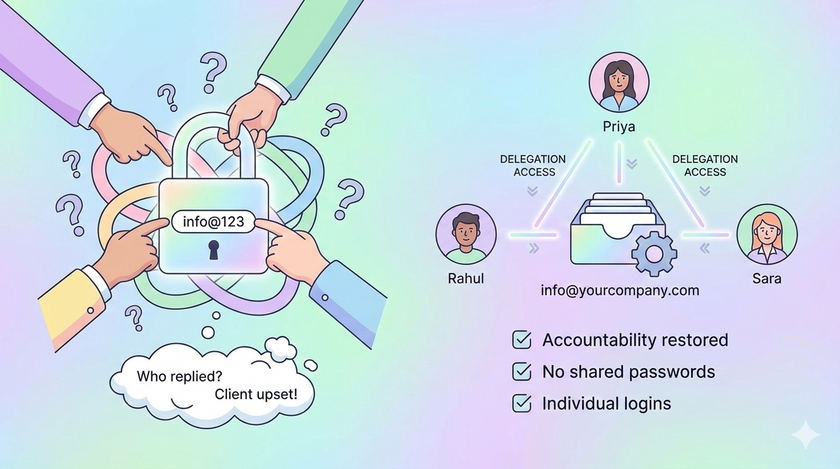
Five people use it. They all know the password. Someone replied to a client yesterday. You do not know who. The client is upset. No one remembers sending that email.
Sound familiar?
The real problem
When five people share one password, you have no idea who did what.
Client says they never got a reply. Who was supposed to reply? Everyone thought someone else did it.
Someone sent wrong pricing to a customer. Who? Could be anyone. The password is the same.
An employee leaves the company. Do you change the password? You should. But then you have to tell four other people the new password. So you do not bother. The ex-employee still has access.
This is not a technology problem. This is an accountability problem.
What most businesses do
They think this is how shared emails work. Multiple people need access. So multiple people share the password. What else can you do?
Actually, there is another way. And it has existed for years.
Gmail Delegation
Google Workspace has a feature called delegation. It lets someone access your inbox without knowing your password.
Think about it. Your receptionist can open the info@ inbox from her own login. Read emails. Reply to emails. Delete emails. All without knowing the info@ password.
And here is the important part. When she sends an email, it shows her name. "Sent by [email protected] on behalf of [email protected]."
Now you know who sent what. Accountability restored.
How it works
The info@ account grants access to Priya. Priya gets an invitation email. She accepts it. Now when Priya opens Gmail, she can switch between her inbox and the info@ inbox with one click. No separate login. No password needed.
If Priya leaves the company, you revoke her access. Takes 10 seconds. No password changes. No informing four other people.
What delegates can and cannot do
| Can Do | Cannot Do |
|---|---|
| Read emails | Change password |
| Send emails | Change account settings |
| Delete emails | Access Google Drive of that account |
| Manage contacts | Chat as that account |
This is perfect. They can do their job. They cannot mess with the account itself.
How to set this up
Step 1: Log into the shared email account ([email protected])
Step 2: Click the gear icon (top right). Click "See all settings"
Step 3: Go to "Accounts and Import" tab
Step 4: Find "Grant access to your account" section. Click "Add another account"
Step 5: Enter the email address of the person you want to give access ([email protected])
Step 6: Click "Next Step" then "Send email to grant access"
Step 7: Priya receives an email. She clicks the confirmation link. Done.
It can take up to 24 hours to activate. Usually happens in 30 minutes.
For the delegate
Once access is granted, Priya does this:
Step 1: Open Gmail normally with her own login
Step 2: Click her profile picture (top right)
Step 3: She will see the delegated account listed. Click on it.
Step 4: A new tab opens with the info@ inbox
No new password to remember. No logging in and out.
Limits you should know
| Account Type | Maximum Delegates |
|---|---|
| Personal Gmail | 10 |
| Google Workspace | 1,000 |
Google recommends not more than 40 people accessing simultaneously. For most businesses, this is more than enough.
When to use Google Groups instead
If you need features like assigning emails to specific people or marking emails as "done" or "in progress," you need Google Groups Collaborative Inbox. That is a different setup. More powerful but more complex.
For most small businesses, delegation is enough.
What to do this week
- List all shared email IDs in your company (info@, sales@, support@, accounts@)
- For each one, list who currently knows the password
- Change the password to something only you know
- Set up delegation for each person who needs access
- Remove access for anyone who should not have it (ex-employees, people who changed roles)
One hour of work. Years of accountability.
The password is not the problem
The password was never the real issue. The issue was that you thought sharing passwords was the only way.
It is not. Google solved this problem years ago. Most businesses just do not know about it.
Now you do.