Open your phone. Go to Google. Tap your profile picture. Look at the email address shown there.
Now think about what is connected to that one address.
Your Razorpay account. Your domain registrar. Your hosting provider. Your GST portal recovery email. Your Instagram business page. Your Meta ads account. Your Zoho subscription. Your cloud storage. Your bank alerts.
Every time a website asked "Sign in with Google," you clicked yes. Every time a service asked for an email, you typed this one.
One email address. One password. One account.
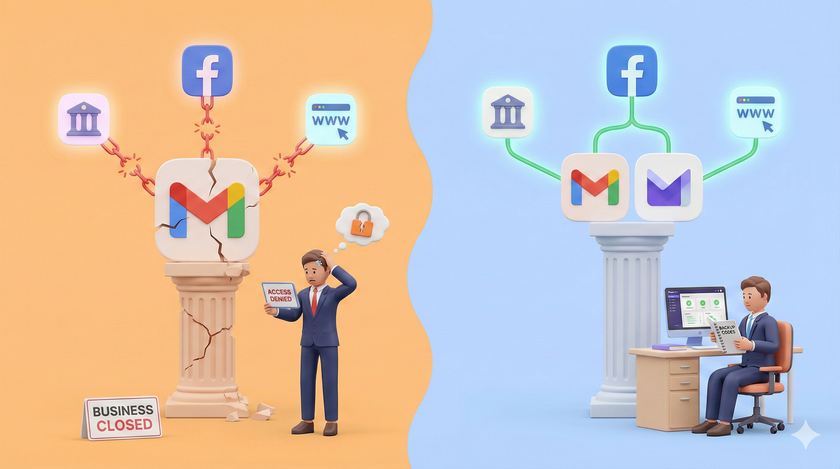
If you lose access to it tomorrow, you do not just lose your emails. You lose the ability to reset passwords on every service connected to it. You lose OTPs. You lose recovery codes. You lose the one door that opens every other door.
This is not a privacy problem. This is a business continuity problem.
I am not talking about someone reading your emails. I am talking about you being unable to run your business for days. Maybe weeks.
Let me walk you through what actually happens.
Monday morning: you are locked out
You open Gmail on your phone. It asks you to verify your identity. You enter your password. Google says "suspicious activity detected" and asks you to verify through a method you set up years ago. An old phone number you do not have anymore.
You try the backup email. You never set one up.
You try the recovery questions. Google does not offer them anymore.
You search for a Google customer support number. There is no number. There is no chat. There is no human. There is a help page that leads to another help page that leads to a community forum where other locked-out people are asking the same questions with no answers.
I wrote about this problem a while back. The single point of failure that most business owners do not think about until it is too late. If you have not read that post, read it after this one. It covers the fix in detail.
Right now, let me show you the damage.
Tuesday: the chain breaks
Your payment gateway sends a verification email. It goes to the Gmail you cannot access. You cannot log into Razorpay.
A customer disputes a payment. Razorpay sends a notification. You never see it. The dispute window closes. You lose the money.
Your domain is up for renewal. The registrar sends a reminder to that Gmail. You miss it. Your website goes offline. Your custom email addresses stop working.
Your Meta ads account flags something. Sends a verification to that Gmail. Your ads pause. Leads stop coming. Your sales team sits idle.
Your hosting provider needs a payment update. Email goes to that Gmail. 72 hours later, your website is suspended.
None of these services were hacked. None of them failed. They all worked perfectly. They just could not reach you.
The dependency map
Take 5 minutes. Write down every service that sends important emails to your primary Gmail.
Most business owners I work with end up with a list of 15 to 25 services. Here is what a typical list looks like:
| Category | Services |
|---|---|
| Money | Razorpay, bank alerts, Tally cloud, payment links |
| Government | GST portal, MCA portal, income tax portal |
| Online presence | Domain registrar, hosting, website builder, SSL certificates |
| Marketing | Meta ads, Google ads, Instagram, email marketing tool |
| Operations | Zoho, Google Workspace admin, cloud storage, accounting software |
| Communication | WhatsApp Business verification, Slack, Zoom |
Every single one of these uses your email for password resets, OTPs, and account recovery.
Lose the email. Lose the keys to all of them.
"But I have the password saved"
Passwords expire. Services force resets. Two-factor authentication sends codes to your email. Payment methods get flagged and require email verification.
Having the password today does not mean you can access the account next month. The email is the fallback. The email is the master key.
The fix is not complicated
I have seen hundreds of businesses running on a single Gmail. The fix takes one afternoon. Not a week. Not a consultant. One afternoon.
I covered the full solution in an earlier post. The short version:
- Create a second email with a provider like Proton Mail or Tuta
- Set up forwarding so everything arriving at Gmail also lands in the second account
- Start updating your most critical services to use the second email as recovery
- If you are serious, buy your own domain so you never depend on any single provider again
The original post explains each step and why it matters. If you skipped it the first time, now you know why you should not.
What to do this week
Day 1. Take the dependency map exercise seriously. Open your Gmail. Search for "verify your email" and "confirm your account." Count how many services show up.
Day 2. Set up a Proton Mail account. Paid tier is better. Forward your Gmail to it.
Day 3. Pick your three most critical services. Payment gateway. Domain registrar. Bank. Update the recovery email on each to your new second address.
Day 4. Turn on 2-step verification on your Gmail if you have not already. Go to myaccount.google.com. Security. 2-Step Verification. Do it now.
Day 5. Write down your recovery phone number and backup email somewhere offline. A physical notebook. A printed sheet in your office safe. Not in Google Keep. Not in a Google Doc.
Five days. One small task each day. After that, losing your Gmail is an inconvenience. Not a catastrophe.
The businesses that survive disruptions are not the ones with the best tools. They are the ones with a backup plan. Your email should have one too.